
Music party game for Home Assistant
Turn Home Assistant into a music quiz party.
Running in 30 seconds. A song plays through the speakers you already own, everyone guesses the year from their phone. No app, no accounts.
- Open source
- In the default HACS store
- v4.8.4
- 514 active installs
- 229 GitHub stars


How it works
Three steps. Thirty seconds.
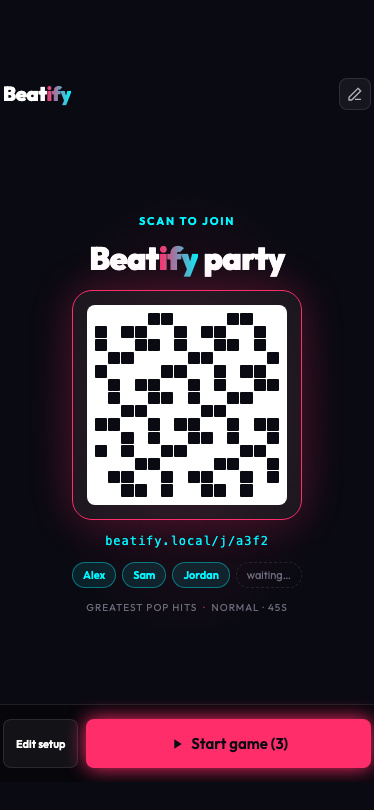
Scan the QR code
The host shows the QR code on the TV. Guests scan it with their camera, type a name and are in. It opens in the phone's browser: no app, no account, iPhone or Android.
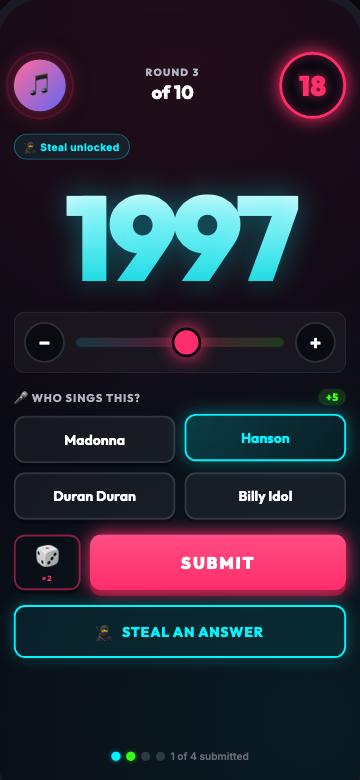
Guess the year
A song plays through your Sonos, Alexa or Music Assistant speakers. Everyone slides to a year on their phone before the ring hits zero.
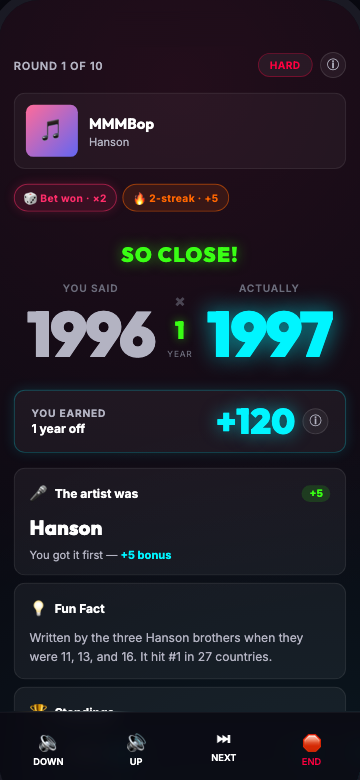
Points, streaks, next song
Closer guesses earn more, faster guesses earn a bonus. Then the real year, a fun fact, and the next song is already playing.
See it played
Under a minute each.
Five short clips, straight from the app. Pick one.
As seen on YouTube
- ES
Este juego GRATIS convierte Home Assistant en una FIESTA (YouTube, opens in a new tab)
Home Assistant y Domótica Fácil
- DE
Beatify 🎵 Musik Quiz Partygame in DEINEM Smart Home mit Home Assistant (YouTube, opens in a new tab)
Sascha Brockel
- EN
There's a Music Trivia Game in Home Assistant?! (YouTube, opens in a new tab)
Home Assistant Podcast
Included playlists
70 playlists. 8,724 songs. Zero boxes to buy.
Each tile is a playlist that ships with Beatify. Decade packs, party packs, and national charts from Finland to Brazil.
- 151
100 Greatest Rock Songs
1964–2026 - 112
100 Summer Anthems
1957–2020 - 66
100% Brasil
1908–2020 - 127
100% en Español
1935–2023 - 100
100% Français
1966–2026 - 224
2000s Pop Anthems
1999–2009 - 124
2010s & 2020s Hits
2000–2024 - 154
40s & 50s Classics
1939–1962 - 82
60s Classics
1960–1971 - 211
70s Hits
1970–1979 - 267
80s Hits
1980–1989 - 40
90s & 2000s Hip Hop Bangers
1990–2008 - 158
90s Hits
1990–1999 - 66
American Classics · Country & Heartland
1951–2022 - 138
Anime Openings
1995–2025 - 189
Ballermann Party Hits
1989–2026 - 100
Best Canadian Hits: Top 100
1968–2025 - 26
Best of Giraffenaffen
1967–2025 - 79
Bollywood Party Hits
1995–2025 - 100
British Invasion & Britpop
1963–1999 - 39
Clásicos del Rock en Español
1984–1998 - 64
Clásicos Disney (Castellano)
1937–2017 - 290
Cologne Carnival
1936–2025 - 118
Deutschpop Klassiker
1973–2019 - 62
Deutschrap Klassiker
1995–2024 - 100
Deutschrock - Best Of
1988–2025 - 98
Disco & Funk Classics
1974–2023 - 69
Disney Classics
1937–2025 - 97
Disney Hits Deutschland
1940–2025 - 54
Disney Latino
1970–2026 - 107
Divorced Dad Rock
1991–2008 - 246
EDM Anthems
1977–2026 - 100
Essential Alternative
1991–2017 - 100
Eurodance 90s
1985–2000 - 72
Eurovision Winners (1956-2025)
1956–2025 - 50
Fiesta Latina 90s
1980–2003 - 293
Finnish Schlager Classics
1949–2026 - 20
Funk Carioca
2000–2018 - 30
Gen Z Anthems
2009–2024 - 236
Greatest Hits of All Time
1961–2009 - 61
Greatest Metal Songs of All Time
1970–2020 - 190
Harder Styles
2003–2025 - 72
ICONIC movie songs
1939–2019 - 24
James Bond Theme Songs
1962–2015 - 100
Motown & Soul Classics
1959–1999 - 257
Movie & TV Soundtracks
1939–2023 - 115
Musica Italiana
1962–2007 - 32
Música Colombiana Alegre
1983–2018 - 50
NDW – Neue Deutsche Welle
1976–1986 - 98
One-Hit Wonders
1965–2011 - 100
Polski Rock
1971–2026 - 92
Polskie hity radiowe
1972–2016 - 59
Polskie przeboje wszech czasów
1966–2023 - 100
Pure Pop Punk
1976–2021 - 126
Québécois 1990-2020
1974–2023 - 36
Rock Rioplatense
1983–2013 - 531
Salsa y Merengue
1957–2023 - 68
Sanremo: I Vincitori
1951–2026 - 193
Schlager Classics
1939–2026 - 97
Schweizer Hits
1981–2026 - 60
Sommerklassiker
1978–2023 - 89
South Africa by Q
1979–2026 - 825
Tomorrowland Top 1000
1990–2026 - 104
Top 100 Dutch Classics
1965–2025 - 99
Top 100 Power Ballads
1972–2005 - 120
Trance Classics
1991–2009 - 41
Vallenato Clásico
1992–2020 - 100
Wiesn Party Hits
1976–2026 - 26
World Cup Anthems
1962–2026 - 100
Yacht Rock
1971–1988
Game features
Learn the drama in nine cards.
Players get a swipeable tour when they scan the QR. This is the website version.
- 01 · Scoring10
points for the exact year. Within 3 years 5, within 5 years 1 (Normal). Easy forgives ±7 and ±10, Hard pays 3 for ±2 and nothing beyond.
closer wins - 02 · Speed bonus2×
when you submit early, 1× at the deadline. The full multiplier holds through a short grace window, then decays linearly.
- 03 · Streak milestones+400
for 25 in a row. The ladder: 3 → +20, 5 → +50, 10 → +100, 15 → +150, 20 → +250, 25 → +400. Miss one and the streak resets.
streak - 04 · Triple or Nothing×3
for the exact year. Toggle the bet before submitting. Miss it, even by a year, and you score nothing that round.
bet - 05 · Steal1
steal per game. A 3-answer streak unlocks it. Tap a rival mid-round to copy their answer when they submit. The comeback token hands one to the bottom third after the halfway round.
steal - 06 · Artist Challenge+5
for the first correct artist after the song. Alternate names accepted. Optional, switched on in game setup.
- 07 · Movie Quiz+5
for the first correct film. Winner takes all, like the Artist Challenge. Only triggers on songs with movie metadata.
optional - 08 · Optional twists7
switches, all off by default: Sudden Death, Finale ×2, Comeback token, Ramp-up ordering, Difficulty-scaled betting (×2 / ×3 / ×5), Sabotage, Streak-Shield.
game setup - 09 · The finaleNEW RECORD!
Fireworks for the winner. Full podium with medals, personal stats, best streaks, bets won. Beat the all-time averages and you get rainbow confetti. Then demand a rematch.
podium
Swipe for more.Use the arrows. Nine cards, every number from the README.
Big-screen dashboard
Put the stage on the TV.
Beatify ships with a dedicated TV display: a landscape, big-format view with the lobby QR code and joined players, round artwork, the year reveal and a live leaderboard. Players keep their phones for guessing. The TV is the shared stage everyone watches.

The TV URL: http://YOUR-HA-IP:8123/
Smart TV, Fire TV or Apple TV browsercleanest
Open the URL directly in the TV's built-in browser. No laptop in the loop, no browser chrome around the page.
Chromecast from Chromelaptop or desktop
Open the URL in Chrome, then the three-dot menu, Cast, Cast tab, your Chromecast. Easiest if you already have the URL up to test.
Home Assistant Lovelace iframe cardmost polished
Embed the dashboard inside a Lovelace view, then open that view on the TV via HA Cast or the HA Companion app. No browser chrome at all.
type: iframe url: /beatify/
static/ dashboard.html aspect_ratio: 56.25%
Sound does not come from the dashboard. Music plays through the speaker you picked in the setup; the TV only shows the stage.
More about sound
Playback is routed via Music Assistant. If you want the sound out of the TV, a soundbar or an AVR attached to it, select that device as the playback target in Music Assistant. The dashboard URL and the audio target are independent; pick each one to fit your room. A Fire TV Stick opened to the dashboard URL gives you a permanent Beatify TV display with one device, no laptop required.
Beatify or the card game?
A free Hitster alternative for Home Assistant.
Honest answer first: if you do not run Home Assistant, buy the box. If you do, read on.
The card game wins on
- Timeline placementThe core mechanic of the card game. Beatify has not implemented it: rounds score a year guess instead.
- SetupOpen the box. Beatify needs Home Assistant 2025.1+, a supported speaker and a HACS install.
Beatify wins on
- What you buyNothing. 70 playlists ship with it, 8,724 songs. The card game sells a box, and a new box or expansion for more music.
- Where the music comes fromSpotify, Apple Music, YouTube Music, Tidal, Deezer, Amazon Music, or your own Plex, Jellyfin or local library. The card game plays a fixed printed deck.
- PlaybackThe Sonos, Alexa or Music Assistant speakers you already own, instead of a phone speaker on the table.
- How you answerGuess the year, or name the title and artist in a second mode.
- Players20+ on their own phones, no app. The card game is limited by its components.
A tie: subscription
The card game needs none. Beatify needs none either since v4.3.0: streaming is one option, your own library is another.
Hitster is a trademark of its respective owner. Beatify is an independent open-source project, not affiliated with or endorsed by it; the name appears here only to describe the kind of game.
FAQ
Four things to know before you install.
Subscription, services, player count and modes. Everything else is one tap further down.
What game modes are there? How do you play Title & Artist?
Two modes, chosen by the host in the setup wizard. Year mode is the classic: a song plays and everyone slides to guess the release year, scored by how close you are. Title & Artist mode asks you to type the song title (+10) and the artist (+5) in free text; small typos earn partial credit and the forgiveness scales with title length. Genuinely close guesses go to Crowd Court, a live 30-second thumbs up or down vote the whole room can watch on the TV; plainly wrong answers are marked Wrong and scored zero. Movie Quiz and Intro bonuses stack on top of either mode.
For a high-stakes twist, turn on Sudden Death (needs at least 3 players): from round 2 on, the lowest-scoring player each round is eliminated until one winner is left standing. Arm it in the wizard or flip it on live from the reveal screen.
How many players can join?
Tested with 20+ players. Your WiFi is the only real constraint.
What music services work?
Spotify, Apple Music, YouTube Music, Tidal, Deezer, and Amazon Music. Support depends on your speaker platform; see the Supported Speakers table in the README for details. Amazon Music is available on Alexa speakers only and plays via voice/text search rather than fixed track URIs.
Do I need a paid music subscription? Does Beatify work with free Spotify?
Not necessarily, there are two ways to play. Streaming needs a paid plan: Beatify plays a specific song on demand each round, and on every provider that requires a paid plan. Spotify Free does not work (its free tier blocks on-demand single-track playback via Music Assistant / Spotify Connect), and a free YouTube Music account does not work either, because the Music Assistant YouTube Music provider supports Premium accounts only. This is a streaming-service limitation, not a Beatify one.
Your own library needs no subscription at all. Since v4.3.0 a game can be sampled from the music you already own: Plex, Jellyfin, local files, anything Music Assistant exposes as a library provider. Beatify resolves release years against MusicBrainz first and discards what it cannot verify, because a compilation rip tagged with its pressing year would make the game unfair. Music Assistant is still required for playback; a streaming subscription is not.
All questions
Why don't my Chromecast/Nest speakers appear?
Cast devices (Chromecast, Nest Audio, Nest Hub, Google TV) don't support direct music playback from Home Assistant. Install Music Assistant and add your Cast devices there. They'll then appear in Beatify and work perfectly.
Can someone join mid-game?
Yes! Late joiners inherit the average score so they can compete fairly.
What if the host disconnects?
Game pauses automatically. Reconnect and continue exactly where you left off.
Something is stuck. What does the Reset button do?
The ↺ button in the admin header is the escape hatch. It ends whatever game is running, clears Beatify's saved setup and its local browser state, drops the cached service worker, and reloads you onto the first step of the setup wizard with nothing pre-selected. It asks before it does any of that, and it is rate-limited to three uses an hour per address.
One thing to know before you press it: the saved setup lives on your Home Assistant, not just on the phone in your hand, so a reset clears it for every device in the household. If you only want to change speaker or playlists, use Edit setup instead.
Do players need to be on the same network?
Yes, players need to access your Home Assistant instance. Works great on home WiFi.
Can I customize the theme?
The neon dark theme is built-in and looks stunning. Custom theming is on the roadmap.
A song starts. Everyone shouts a year at the speakers. Someone is gloriously, confidently wrong — and the room lets them know.
From the Beatify README
Will this work for me?
Three things decide it.
Check them before you install. Beatify itself is free and runs entirely on your own Home Assistant.
Home Assistant 2025.1 or newer
Beatify is a custom integration. Anything older than 2025.1 is not supported.
A supported speaker
Music Assistant (any speaker it drives), Sonos, or Alexa. Chromecast, Nest and HomePod work only through Music Assistant.
A music source
Either a paid streaming plan (Spotify, Apple Music, YouTube Music, Tidal, Deezer or Amazon Music; free tiers can't play a chosen track on demand, so Spotify Free won't work) or your own music library through Music Assistant: Plex, Jellyfin or local files, with no subscription at all.
Supported speakers
Music Assistant plays Spotify, Apple Music, YouTube Music, Tidal and Deezer by direct track link. Amazon Music is Alexa only and is played by name search, so Alexa occasionally picks a live version or remaster of a track. The setup wizard shows which of your players are supported.
Install
Install via HACS.
Beatify is in the default HACS store, so there is nothing to add manually.
- HACS
- Search Beatify
- Download
- Restart Home Assistant
- Settings
- Devices & Services
- Add Integration
- Beatify
First game
Your first game in 2 minutes
- Open. In the Home Assistant sidebar, select Beatify, then Open Beatify.
- Set up. On your first visit, choose a speaker, music service and playlist in the guided wizard.
- Invite. On Ready to host, show the QR code. Guests scan it with any phone and enter their name.
- Play. When everyone appears in the lobby, select Start game.
Returning hosts skip the wizard and go straight to Ready to host.